Best Smart Home Devices for Aging in Place in 2026
 Diana Sterling educational
 At a Glance
The best smart home devices for aging in place — safety monitors, emergency alerts, smart thermostats. Honest picks for women 50+ who want to stay independent.
Products in This Article
This post contains affiliate links. If you purchase through our links, we may earn a small commission at no extra cost to you.
Staying in your own home longer isn’t just a preference — for most women over 50, it’s the plan. The right smart home technology for seniors can make that plan realistic, safe, and far less dependent on daily family check-ins.
Introduction: Why Smart Home Technology Matters for Aging in Place
The numbers are clear: according to AARP, nearly 90% of adults over 65 want to remain in their homes as they age. What’s less discussed is how much the best smart home devices for aging in place have improved — and dropped in price — in just the last few years.
We’re no longer talking about complicated systems that require a tech-savvy grandson to set up. Today’s aging in place smart home solutions are designed for straightforward installation, voice control, and smartphone monitoring by both the senior and their family. The categories that matter most:
- Emergency response — fall detection, SOS buttons, caregiver alerts
- Environmental control — smart thermostats, lighting automation
- Communication — two-way audio/video, voice assistants
- Remote monitoring — cameras, sensors, app-based check-ins
This guide covers all four, with specific product recommendations and honest assessments of what’s worth your money.
Essential Smart Home Devices for Senior Safety and Independence
Start with the devices that address the highest-risk situations: falls, medical emergencies, and the inability to communicate quickly. These are the non-negotiables for any aging in place smart home setup.
Priority order for purchase:
- Emergency call/alert system (wearable or room-based)
- Smart thermostat with remote monitoring
- Voice assistant or smart display
- Supplemental automation (lights, locks, sensors)
Affordable smart home devices for seniors don’t require a full ecosystem overhaul. Buy one category at a time, starting with safety.
Smart Monitoring and Emergency Response Systems
These four products address the most critical need: getting help fast when something goes wrong.
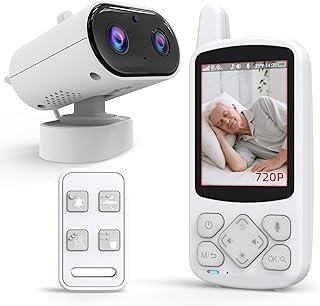
CallToU Elderly Monitor with Camera and Audio Call Button
Verdict: Strong room-based monitoring option for those who want two-way communication without wearing a device.
At $109.99, this combines a camera, two-way audio, and a physical call button — so a senior can press a button and immediately speak with a caregiver or family member. It’s particularly well-suited for bedroom or living room placement. Rated 4.1/5 across 53 reviews, with users noting the audio clarity and ease of button use. Price-per-use value is strong if it’s replacing daily caregiver visits or reducing family anxiety.
| Pros | Cons |
|---|---|
| Two-way audio + video in one unit | Requires WiFi setup |
| Physical call button — no app needed for the senior | Moderate review count (53) |
| Suitable for dementia patients | Camera raises privacy considerations |
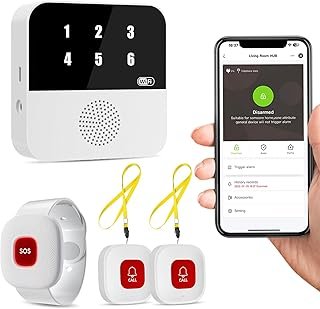
WiFi Caregiver Pager Smart Call System (PILSAMAS)
Verdict: A capable no-monthly-fee alert system with app integration — good value at $44.96.
This system includes an IP65 waterproof wristband plus two call buttons, and sends app alerts directly to caregivers’ smartphones. It displays Caller ID so the caregiver knows which button was pressed — useful in multi-room setups. Rated 4.4/5 from 41 reviews. No subscription fee is a genuine advantage over many medical alert competitors. At roughly $45, the price-per-use is excellent if it prevents even one delayed emergency response.
| Pros | Cons |
|---|---|
| No monthly fee | Newer product (41 reviews) |
| IP65 waterproof wristband | Requires smartphone for caregiver alerts |
| Caller ID display identifies button location | WiFi dependent |
WiFi Caregiver Pager Wireless Call Button (PILSAMAS — 2-Button Kit)
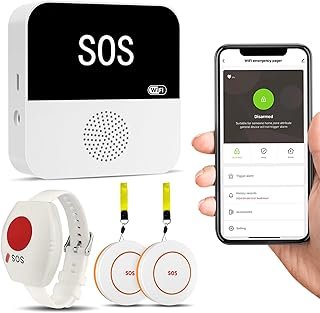
Verdict: The most reviewed option in this category — 137 ratings at 4.3/5 makes this the confidence pick among affordable smart home devices for seniors.
At $39.92, this kit includes two wall-mounted call buttons plus a wristband panic button with app alerts and no monthly fee. The higher review count (137 vs. competitors in this list) gives more confidence in consistent performance. Ideal for a senior living alone who needs coverage in multiple rooms — bathroom and bedroom, for example.
| Pros | Cons |
|---|---|
| Highest review count in category (137) | App required for remote alerts |
| No monthly fee | No camera/audio component |
| Wristband + 2 wall buttons included |
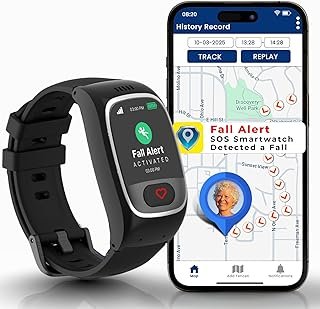
Seculife Smartwatch Medical Alert with GPS and Fall Detection
Verdict: The only wearable in this roundup that works outside the home — GPS tracking and fall detection make it the right choice for active seniors.
At $90.50, the Seculife includes GPS tracking, automatic fall detection, two-way calling, and an SOS button — all in a wristwatch form factor. Rated 4.1/5 from 23 reviews (newer product, lower count). The key differentiator: this device functions beyond the front door, which none of the pager-style options do. If the senior in your life drives, walks independently, or travels, this is the device that bridges home and away safety.
| Pros | Cons |
|---|---|
| GPS works outside the home | Low review count (23) — newer product |
| Automatic fall detection | May require cellular plan for GPS |
| Two-way calling built in |
Reader tip: “My mother resisted wearing a medical alert pendant for years because it looked clinical. She accepted the Seculife watch immediately because it looks like a regular watch. Don’t underestimate the dignity factor when choosing a device.” — Flourish & Find reader, submitted via email
Voice-Activated Assistants and Smart Displays for Seniors
Voice control is one of the most impactful smart home automation for independent living tools available. Seniors with arthritis, limited mobility, or vision changes benefit significantly from hands-free control of lights, thermostats, reminders, and calls. Amazon Echo and Google Nest displays are widely used, but the key is pairing them with other smart devices in this list so they form an integrated system rather than a standalone gadget.
What voice assistants can realistically do for seniors:
- Set medication reminders
- Make hands-free phone calls
- Control smart thermostats and lights
- Answer questions and provide weather/news
- Drop in for family check-ins (Echo Dot with Drop In feature)
The best smart speakers for elderly care are those already in the home ecosystem of their adult children — if your daughter uses Alexa, start with Echo devices so the family can easily help troubleshoot.
Smart Home Automation for Accessibility and Convenience
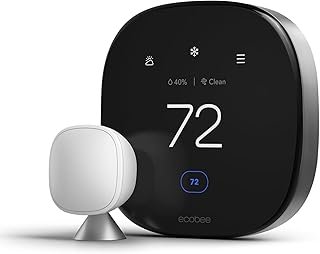
ecobee Smart Thermostat Premium
Verdict: The most robustly reviewed product in this roundup — 4,000+ ratings at 4.3/5 — and the only one that monitors air quality alongside temperature.
At $232.00, the ecobee Premium is the highest-priced item here, but it covers more ground than a standard thermostat. It monitors indoor air quality (VOCs, CO2 levels, humidity), integrates with Alexa, Siri, and Google Assistant for voice control, and allows remote temperature management via app. For seniors who are sensitive to temperature extremes — a genuine health risk — or who live alone where air quality issues might go unnoticed, this is a high-value safety device as much as a comfort device.
Price-per-use context: at $232 over a 5-year lifespan, that’s under $4/month for remote environmental monitoring plus voice-controlled climate comfort.
| Pros | Cons |
|---|---|
| 4,000+ reviews — highest confidence in this roundup | $232 — highest price point |
| Air quality monitoring included | Professional installation may be needed |
| Works with Alexa, Siri, Google Assistant | |
| Remote app control for family members |
Tips for Choosing and Installing Smart Devices for Elderly Family Members
Smart home devices for elderly safety only work if they’re actually used. These are the practical considerations that determine whether a device gets adopted or ends up in a drawer.
1. Involve the senior in the decision. Devices chosen without input are frequently rejected. Show options, explain what each does, and let the person choose. Autonomy matters.
2. Prioritize no-monthly-fee options first. The PILSAMAS pager systems above are strong examples. Monthly fees add up and create cancellation friction later.
3. Start with one device, not a full system. A single call button that works reliably builds trust in the technology. A complex ecosystem installed all at once overwhelms.
4. Match the device to the living situation:
| Situation | Recommended Starting Device |
|---|---|
| Lives alone, rarely leaves home | PILSAMAS 2-button pager kit ($39.92) |
| Lives alone, active and mobile | Seculife GPS smartwatch ($90.50) |
| Has cognitive decline, needs monitoring | CallToU camera + call button ($109.99) |
| Family wants environmental oversight | ecobee thermostat ($232.00) |
5. Test the device yourself before handing it over. Know how to troubleshoot the app, reset the device, and replace batteries before the senior needs to use it in an emergency.
6. Label everything simply. A piece of masking tape that reads “Press for help” on a call button removes hesitation in a crisis.
Frequently Asked Questions About Senior Smart Home Setup
Do smart home devices require a monthly subscription? Not always. The PILSAMAS pager systems featured here have no monthly fee. Devices with GPS cellular service (like the Seculife smartwatch) typically require a data plan. Always check before purchasing.
What’s the most important smart home device for aging in place? An emergency alert system — specifically one the senior will actually wear or use. The best technology is useless if it’s not accessible in a fall or medical event.
Can family members monitor these devices remotely? Yes. The CallToU monitor, both PILSAMAS pagers, and the Seculife smartwatch all include app-based alerts that notify caregivers or family members in real time.
Are these devices difficult to set up? The pager systems are among the simplest — plug in, connect to WiFi, download app. The ecobee thermostat requires replacing the existing thermostat, which may need a professional for homes without a common wire.
What if the senior doesn’t have a smartphone? The CallToU room monitor and the basic PILSAMAS pager work with a caregiver’s smartphone, not the senior’s. The senior only needs to press a button.
The best smart home devices for aging in place aren’t about turning a home into a tech showroom. They’re about removing specific risks — delayed emergency response, temperature extremes, isolation — with targeted, practical tools. Start with the safety layer, add comfort automation second, and build from there.
Which of these would you try first — or which would you consider for a parent or family member? The comment section is open.